版本比较

标识

  • 该行被添加。
  • 该行被删除。
  • 格式已经改变。
Sv translation
languagezh_CN

目录

固件链接:


烧录工具、驱动链接:https://pan.baidu.com/s/1ugVAJ35VeWkUoKOjiLgvXQ?pwd=3iyb 提取码: 3iyb

一、准备工作

1.RUPAClaw-RC1 主机

2. USB2.0 A to C 线

3.镊子

4.12V 电源适配器

5.Windows电脑

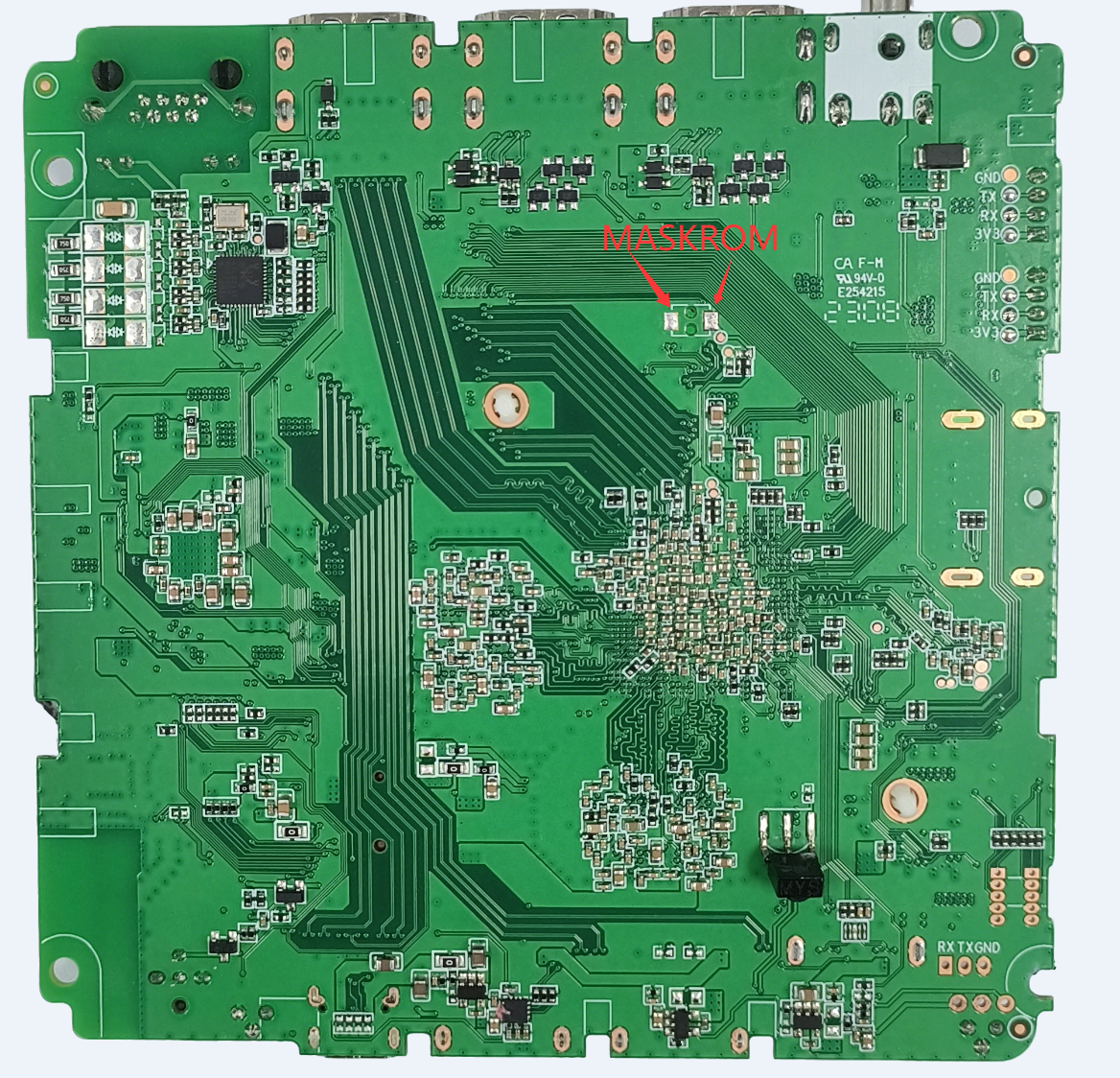
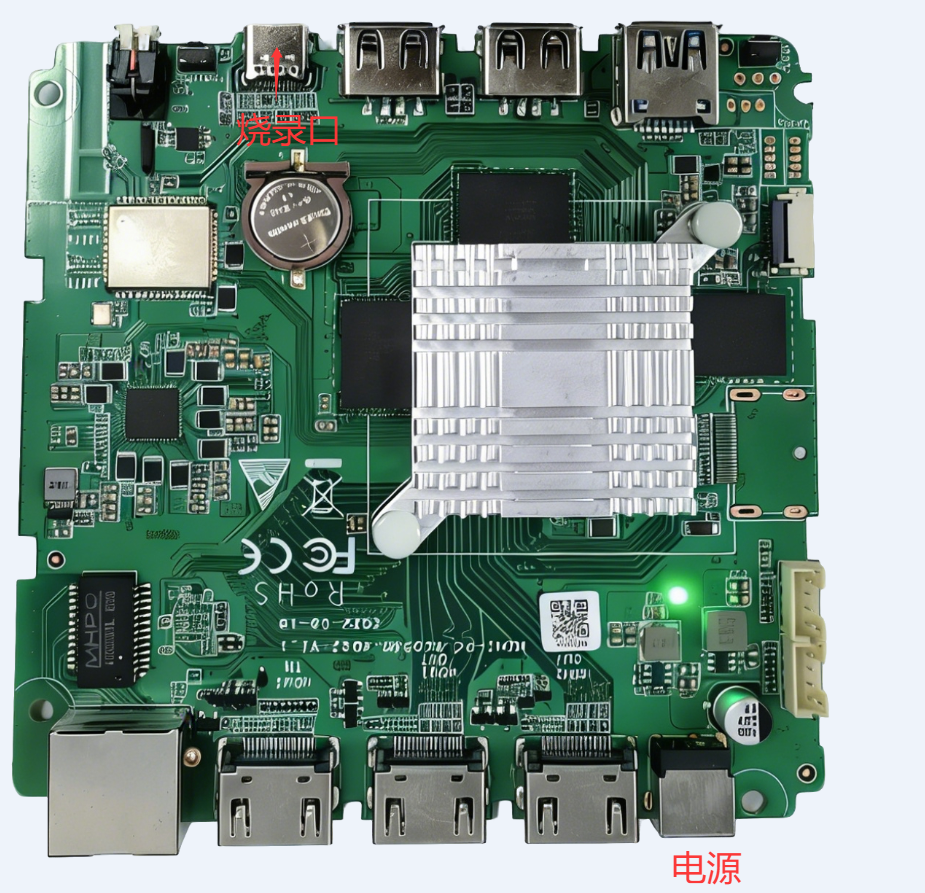
用USB 线将电脑与 RUPAClaw-RC1 主机 type-c口连接,用镊子短接MASKROM键 两焊点,再上12V电源,让机器进入MASKROM 模式。

如果EMMC 空片,可以不用MASKROM键。烧录过Armbian系统的机器,必须要用镊子短接MASKROM键才可以重新烧录固件。

Image Added

Image Added


二、烧录方法

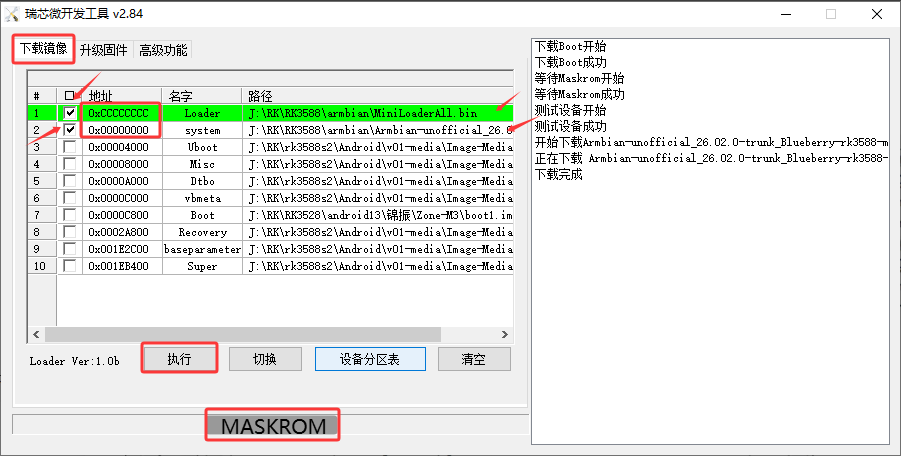
1.将瑞芯微开发工具打开,版本要V2.84 以上版本

2.加载Loader 和system 文件,并勾选。Loader地址为0xcccccccc;system地址为0x00000000。

3.让机器进入MASKROM 模式,如果是loader模式,可以在高级里面切换到MASKROM模式

4.单击 “执行” 进入下载,下载过程预计5分钟。

Image Added


Sv translation
languageen


Firmware Link:

Flashing Tool & Driver Link: https://pan.baidu.com/s/1ugVAJ35VeWkUoKOjiLgvXQ?pwd=3iyb
 Password: 3iyb

I. Preparation


  1. RUPAClaw-RC1 host
  2. USB 2.0 A to C cable
  3. Tweezers
  4. 12V power adapter
  5. Windows computer


Connect the computer to the Type‑C port of the RUPAClaw‑RC1 host using a USB cable. Short the two solder points of the MASKROM button with tweezers, then power on with the 12V adapter to put the device into MASKROM mode.

  • If the eMMC is blank, the MASKROM button is not required.
  • For devices that have been flashed with Armbian, you must short the MASKROM button to reflash the firmware.


Image Added

Image Added


II. Flashing Procedure


  1. Launch Rockchip Development Tool. Version V2.84 or higher is required.
  2. Load the Loader and system files, then check the corresponding boxes.
     Loader address: 0xcccccccc
     System address: 0x00000000
  3. Put the device into MASKROM mode. If it is in Loader mode, switch to MASKROM mode via Advanced settings.
  4. Click Execute to start downloading. The process takes approximately 5 minutes.


Image Added